
Audit What Your AI Builder Actually Shipped
Stop guessing what's wrong with your website. Performance, security, SEO infrastructure, AI-readiness, and a prioritized fix list you can execute with us or anyone else.
AI launch support
You generated it with AI. We make it live, secure, and production-ready, usually within a week: custom domain, DNS, SSL, and the Supabase wiring your builder never explained for Lovable, v0, and Bolt; a security pass over Replit's self-written database and auth.
deploy pipeline
deploy verified
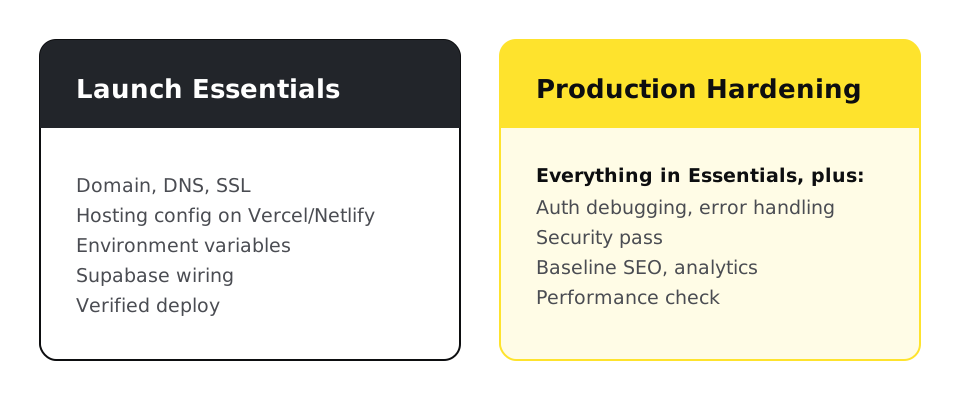
If your AI-built app works on localhost but not on your domain, the gap is deployment configuration: DNS records, SSL, environment variables, and database URLs that the builder set for its own preview environment, not yours. Launch Essentials fixes all of it for $950 fixed; Production Hardening adds auth debugging, security, and baseline SEO for $2,950. Replit is the exception: it writes its own backend, so its gap is usually a security review, not just configuration.
Point your domain's DNS at your host, configure SSL, and update every environment variable and callback URL that still references the builder's preview domain. That last step is where most launches die: the app deploys fine but auth, database calls, or API routes silently fail because they're still configured for the sandbox. Launch Essentials ($950 fixed) covers domain, DNS, SSL, hosting config on Vercel or Netlify, environment variables, Supabase wiring, and a verified deploy. The builder-specific steps start at theAI app launch hub, or go straight to theLovable guide,v0 and Bolt.new guide, andReplit guide.
Because your production domain isn't in Supabase's allowed URLs, or your environment variables still point at the wrong project. The browser blocks the request, Supabase never sees it, and the error message tells you almost nothing. It's the single most common AI-builder launch failure we fix, and it's configuration, not code. Thev0 and Bolt.new guide walks through the exact error.

This exact checklist unbreaks most "works on localhost" apps:
Before
✕ TypeError: Failed to fetch
supabase.co/auth/v1 · blocked by CORS
After
✓ Site URL added to allowlist
auth + database calls succeed
bash - production config checklist
# 1. Environment variables on your host (Vercel/Netlify), not in the repo:
VITE_SUPABASE_URL=https://<your-project-ref>.supabase.co
VITE_SUPABASE_ANON_KEY=<your-anon-key>

# 2. DNS records at your registrar (Vercel example):
# A      @      76.76.21.21
# CNAME  www    cname.vercel-dns.com

# 3. Supabase → Authentication → URL Configuration:
#    Site URL:      https://yourdomain.com
#    Redirect URLs: https://yourdomain.com/**
If auth works locally and fails on your domain, item 3 is the culprit more often than not.
Yes. Lovable, v0, and Bolt mostly ship a static frontend wired to a hosted backend like Supabase, so the launch gap is configuration: DNS, SSL, environment variables, callback URLs. Replit Agent writes its own backend, a live database, its own auth flow, server endpoints it wrote itself, which is a different risk profile. That needs a security review, not just a domain: parameterized queries instead of string-built SQL, server-side authorization on every route, and secrets rotated out of version history.
Lovable, v0, Bolt
Static frontend + hosted backend
Supabase handles the database and auth. The launch gap is configuration: DNS, SSL, environment variables, callback URLs.
Replit
Self-written backend
Replit Agent writes its own database queries, auth flow, and API routes. The launch gap is a security review, not just configuration.
The builders document their own domain setup and, for Lovable, a security scan. The gap is in the parts around them. Linked facts come from vendor documentation, checked 10 October 2026; unlinked cells are our description.
Sources, checked 10 October 2026
Everything in Launch Essentials plus auth debugging and error handling, a security pass, baseline SEO (meta tags, sitemap, semantic HTML your builder never generated), analytics, and a performance check, for $2,950 fixed. Who needs it: if real customers or payments touch the app, harden it; if it's a demo, Essentials is enough.
We take Lovable, v0, Bolt, and Replit projects from localhost to a live, secure custom domain: DNS, SSL, database, and all.
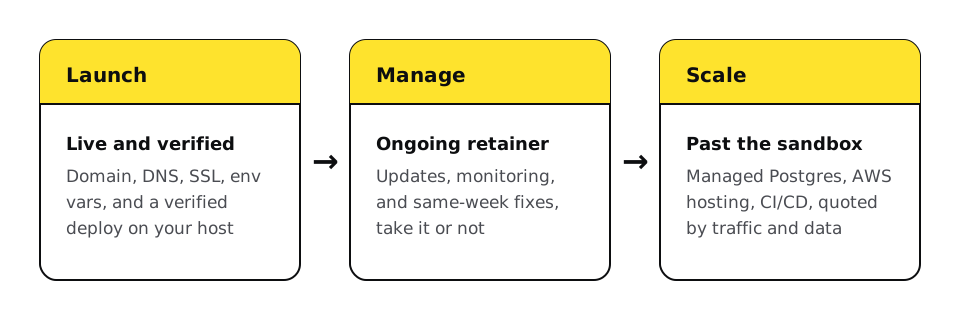
The same thing that happens to every website: it needs updates, monitoring, and someone to call. Every launch ends with a handoff offer into a Management Retainer (from $97/mo), and apps that outgrow the builder's infrastructure get a scaling path: databases, AWS hosting, and CI/CD, quoted by traffic, data model, and integrations.
Stop guessing what's wrong with your website. Performance, security, SEO infrastructure, AI-readiness, and a prioritized fix list you can execute with us or anyone else.
Predictable monthly retainers that keep your website updated, secure, backed up, and monitored, on any platform, including custom PHP/CodeIgniter applications.
Grounded AI assistants built from your actual content, tested against wrong answers, capped with a token budget, and monitored in production.
The exact DNS, SSL, and Supabase steps for taking a Lovable app onto a custom domain.
The same launch process, scoped to what v0 and Bolt.new apps specifically need.
A security review of the database, auth, and secrets Replit Agent wrote, not just a custom domain.
What changes once an AI-built app is live, and who fixes it when the builder cannot.
Answer-quality monitoring, hallucination spot-checks, and token budgets for whatever AI your launched app already runs.
A chatbot grounded in your app's own content, not a generic widget bolted on after launch.
Going deeper
Because localhost and production are different environments, and the builder only configured the first one. Environment variables, callback URLs, CORS settings, and database allowlists all reference the preview environment until someone updates them. That's the whole gap, and it's fixable in days.
Export or connect the repo, deploy it to a host like Vercel or Netlify, point your DNS at the host, and reconfigure environment variables for production. Builders also offer built-in hosting; moving off it is worth it when you need your own domain, analytics, or infrastructure control.
At minimum, whatever your app reads for its backend: Supabase URL and anon key, API keys for third-party services, and any auth secrets. They live in your host's dashboard, never in the repository. The launch checklist inventories all of them per app.
Not by default. Some builders now scan before publishing, and Lovable states its scans do not replace a thorough security review. Production Hardening is that review by a person: keys, database rules, authorization, and input validation. For apps handling payments or personal data, don't skip it.
No. Lovable, v0, and Bolt mostly need deployment configuration against a hosted backend like Supabase. Replit Agent writes its own backend, so it needs a security review of the database, auth, and secrets it generated, not just a custom domain.
Usually missing meta tags, no sitemap, and divs where semantic HTML should be. AI builders generate what renders, not what ranks. Hardening adds the baseline: titles, descriptions, sitemap, semantic structure, and an indexability check.
Launch Essentials is usually live within a week of getting access. Hardening adds days depending on what the security pass finds. The bottleneck is most often DNS propagation and access handover, not the engineering.
Yes. When the built-in database or hosting hits its limits, we move the app onto real infrastructure: managed Postgres, AWS hosting, CI/CD. That work is quoted by traffic, data model, and integration count.
No. Every launch ends with a handoff offer into a management retainer, from $97/month, covering updates, monitoring, and same-week fixes. Take it or not; the app is documented either way.
Lovable, v0, Bolt, Replit
AI builders skip the production hardening a real launch needs. The audit tells you exactly what's missing before customers find out.